
Introduction to Peacock Streaming
Peacock, NBCUniversal’s streaming platform, has emerged as a significant player in the competitive streaming landscape since its launch in July 2020. Named after NBC’s iconic logo, the service offers a tiered subscription model that includes a free ad-supported tier, an affordable Premium tier, and the ad-free Premium Plus option. This guide will provide you with exhaustive information about Peacock Premium Plus, including its features, content offerings, and detailed signup instructions across various platforms.
You May Also Like- Peacock : Start Streaming Today with This Simple Login Guide Visit : Peacocktv.com tv/samsung
What is Peacock Premium Plus?
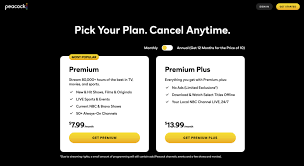
Peacock Premium Plus represents the platform’s highest subscription tier, offering users an enhanced viewing experience. While the basic Premium tier ($5.99/month) includes the full Peacock content library with limited ads, Premium Plus ($11.99/month) provides that same extensive library completely ad-free for most content, along with several additional benefits.
Key Features of Premium Plus:
- Ad-Free Viewing: The primary benefit—most movies, TV series, and Peacock Originals stream without commercial interruptions (live channels and some licensed content may still include ads).
- Download Functionality: Subscribers can download select titles to watch offline on mobile devices—perfect for travel or areas with limited connectivity.
- Full Access to Peacock’s Library: Includes everything available on the Premium tier:
- Next-day access to current NBC shows
- Live sports including Premier League, NFL, Olympics, and more
- Early access to late-night talk shows
- Peacock Originals like “The Office” reboot, “Bel-Air,” and “Poker Face”
- Extensive movie library including Universal Pictures titles
- Curated channels for continuous streaming
- Local NBC Channel Live Stream: In most markets, Premium Plus subscribers can stream their local NBC station live.
Step-by-Step Signup Process
Method 1: Signing Up Through the Peacock Website
- Visit the Official Site: Navigate to Peacock website using any web browser on your computer, tablet, or smartphone.
- Create an Account: Click the “Sign Up” or “Get Started” button prominently displayed on the homepage. You’ll be prompted to enter your email address and create a password. Alternatively, you can sign up using existing Google or Apple accounts for faster registration.
- Select Your Plan: After creating your account, you’ll be presented with the three subscription tiers. Click on “Peacock Premium Plus” to select the ad-free option. You’ll see the monthly price displayed ($11.99) along with any promotional offers that might be available.
- Enter Payment Information: You’ll need to provide valid payment details. Peacock accepts major credit/debit cards (Visa, MasterCard, American Express, Discover) and PayPal. The service doesn’t accept prepaid cards or gift cards for recurring subscriptions.
- Review and Confirm: Before finalizing, review your selected plan, payment method, and billing details. Check for any terms and conditions, particularly regarding billing cycles and cancellation policies.
- Start Streaming: Once your payment is processed, you’ll receive a confirmation email and can immediately begin exploring Peacock’s content library.
Method 2: Signing Up Through Mobile Apps
iOS Devices (iPhone/iPad):
- Download the Peacock app from the Apple App Store.
- Open the app and tap “Sign Up.”
- Follow similar steps as the web method, but note that payments will be processed through your Apple ID account, utilizing whatever payment method you have on file with Apple.
- Subscription management for iOS signups must be handled through your Apple ID settings.
Android Devices:
- Download the Peacock app from the Google Play Store.
- Open the app and select “Sign Up.”
- You can choose to pay through Google Play billing (using your Google payment method) or enter credit card information directly.
- Like iOS, subscriptions initiated through Google Play must be managed via your Google account settings.
You May Also Like- Peacock : Start Streaming Today with This Simple Login Guide Visit : Peacocktv.com tv/vizio
Method 3: Signing Up Through Streaming Devices
Peacock is available on numerous streaming platforms, each with slightly different signup procedures:
Amazon Fire TV:
- Navigate to the Peacock app in the Amazon Appstore.
- Select “Download” or “Get.”
- Open the app and choose “Start Free Trial” or “Sign Up.”
- You’ll have the option to subscribe through Amazon Channels or create a standalone Peacock account with separate billing.
Roku:
- Add the Peacock channel from the Roku Channel Store.
- Launch the channel and select “Sign Up.”
- You can either subscribe directly through Roku Pay or create an account on the web and then link it to your Roku device.
Apple TV:
- Download the Peacock app from the tvOS App Store.
- Open the app and select “Start Free Trial.”
- Subscriptions are typically managed through your Apple ID.
Smart TVs (LG, Samsung, Vizio):
- Access your TV’s app store and download the Peacock app.
- Launch the app and follow the on-screen prompts to sign up.
- Most smart TVs will direct you to visit Peacock website on another device to complete registration using a code displayed on your TV screen.
Gaming Consoles (Xbox, PlayStation):
- Find and install the Peacock app from your console’s store.
- Open the app and follow the signup process, which typically involves device activation via a web browser.
Payment Options and Billing Details
Peacock Premium Plus costs $11.99 per month plus applicable taxes. You can also opt for an annual subscription at $119.99 per year, representing approximately two months of savings compared to monthly billing.
Important Billing Notes:
- Your subscription automatically renews each month or year unless cancelled.
- You can upgrade or downgrade your plan at any time through your account settings.
- Promotional pricing may be available for students, military personnel, or through bundled offers with other services.
- Some internet service providers (like Xfinity) offer Peacock Premium at no additional cost to their customers, though Premium Plus usually requires an upgrade fee.
Device Compatibility and Limitations
Peacock Premium Plus supports streaming on multiple devices simultaneously:
- Three streams at once: You can watch on up to three different devices concurrently.
- Device limits: You can download the app and sign in on an unlimited number of devices, but only three can stream simultaneously.
- Download limits: Offline downloads are limited to a specific number of titles per account (typically 25-30 downloads at once) and have expiration dates (usually 30 days from download or 48 hours from when you start watching).
Supported devices include:
- Web browsers (Chrome, Firefox, Safari, Edge)
- iOS and Android smartphones/tablets
- Apple TV (4th generation and later)
- Roku devices and Roku TV
- Amazon Fire TV and Fire tablets
- Android TV devices
- Xbox One and Series X/S
- PlayStation 4 and 5
- Select smart TVs from LG, Samsung, and Vizio
- Chromecast and AirPlay 2 compatible devices
Content Highlights on Peacock Premium Plus
Understanding what you’re paying for is crucial. Peacock Premium Plus offers:
Exclusive Originals: “Dr. Death,” “The Capture,” “Rutherford Falls,” “The Girl in the Woods,” and upcoming series like “The Endgame.”
Beloved Franchises: Complete series of “The Office,” “Parks and Recreation,” “Yellowstone” (previous seasons), “Law & Order” universe, and “Real Housewives” franchises.
Movie Library: Universal Pictures titles (available 45 days after theatrical release), plus classics from the Universal library, DreamWorks animations, and Focus Features.
Live Sports: Extensive Premier League coverage, Sunday Night Football, Olympics, golf, rugby, WWE Network content, and more.
News & Reality: Access to NBC News NOW, Sky News, TODAY All Day, and reality shows like “The Real Housewives” and “Below Deck.”
Kids Content: Family-friendly programming including “Curious George,” “Cleopatra in Space,” and “Where’s Waldo?”
Troubleshooting Common Signup Issues
- Payment Declined: Ensure your payment method has sufficient funds and your billing information matches exactly what’s on file with your financial institution. International cards may not be accepted.
- Geographic Restrictions: Peacock is currently only available in the United States and its territories. Attempting to sign up from outside these areas will result in an error message.
- Email Already in Use: If you’ve previously used a free Peacock account or participated in a trial, use the “Forgot Password” option rather than creating a new account.
- Promo Code Not Working: Promotional codes are typically case-sensitive and have expiration dates. Ensure you’re entering it correctly during the signup process.
- Device Compatibility Issues: Verify that your device meets minimum system requirements and is running the latest operating system updates.
Managing Your Subscription
After signing up, you can manage your account by:
- Visiting Peacock website on any web browser
- Clicking on your profile icon within the Peacock app
- Adjusting streaming quality settings (up to 4K HDR on supported content and devices)
- Setting up parental controls for family viewing
- Reviewing watch history and continuing watching progress
- Adding shows to your watchlist for easy access
Cancellation Policy
You can cancel Peacock Premium Plus at any time without early termination fees. If you cancel mid-billing cycle, you’ll retain access until the end of your paid period. To cancel:
- Go to your Account page
- Select “Cancel Subscription”
- Follow the prompts to confirm cancellation
- You’ll receive an email confirmation of your cancellation
Comparison with Competitors
When evaluating Peacock Premium Plus against other streaming services:
- Price: At $11.99/month, it’s more affordable than Netflix Premium ($22.99) or HBO Max ($15.99), but more expensive than Disney+ ($7.99) or Apple TV+ ($6.99).
- Content: Strong in specific areas like NBC classics, Universal movies, and live sports (particularly Premier League).
- Simultaneous streams: Three streams compares favorably to Netflix’s one-stream Basic plan but falls short of Netflix Premium’s four streams.
You May Also Like- Peacock : Start Streaming Today with This Simple Login Guide Visit : Peacocktv.com/tv
Final Recommendations
- Consider the Annual Plan: If you’re confident you’ll use Peacock regularly, the annual subscription saves approximately $24 compared to monthly billing.
- Utilize Free Trials: Peacock occasionally offers 7-day free trials for Premium Plus—perfect for testing the service before committing.
- Check for Bundles: Some credit cards, internet providers, or other services offer Peacock as part of bundled packages that might represent better value.
- Evaluate Your Needs: If you can tolerate limited ads and don’t need offline viewing, the standard Premium tier at $5.99 might suffice. Premium Plus is ideal for those who prioritize uninterrupted viewing and mobile flexibility.
Signing up for Peacock Premium Plus is a straightforward process that opens access to a substantial and growing content library. With its competitive pricing, strong originals development, and excellent sports offerings—particularly for soccer fans—it represents a compelling option in the streaming marketplace. Whether you’re drawn by specific franchises, live sports, or simply want another quality streaming option without commercials, Peacock Premium Plus delivers a robust viewing experience that justifies its price point for the right viewer.